
PHOTONFORGE
LEARNING CENTER






Quick Start
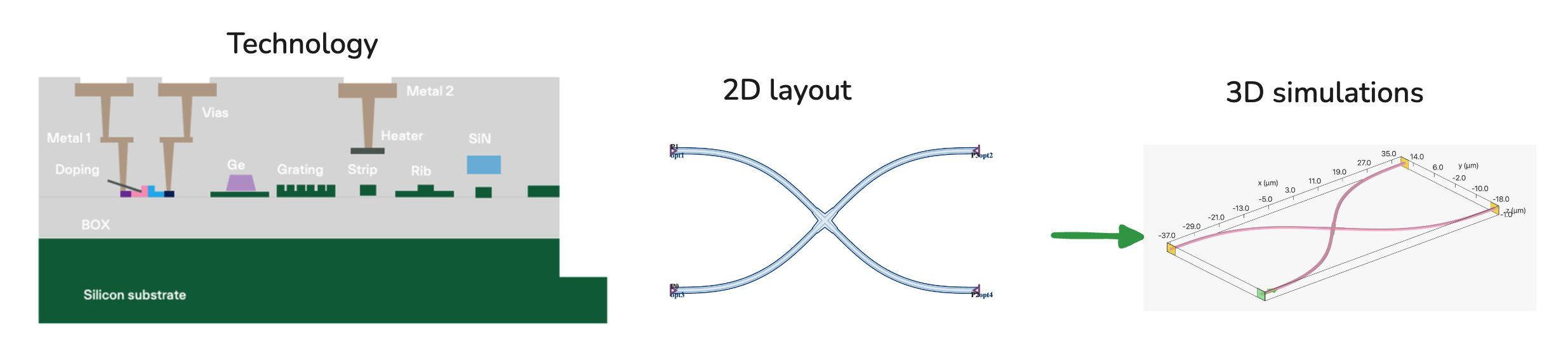
In this quick start, we will show you how to:
- Load a foundry Process Design Kit (PDK) in PhotonForge
- Load PDK components
- Run FDTD simulation by converting 2D layout files to 3D for electromagnetic simulations in a single line of code
Step 1: Loading a Foundry PDK
Start by importing numpy, photonforge, and siepic pdk library:
import numpy as np
import photonforge as pf
import siepic_forge as siepic_pdk
Select the open source ebeam process node, also called the technology stack:
# load the technology and set it as the default
technology = siepic_pdk.ebeam()
pf.config.default_technology = technology
You can inspect the technology object to see all the layer definitions, extrusion specs, port types, and background medium:
technologyYou can also inspect the technology's random variables for process variation analysis:
technology.random_variables[RandomVariable('si_thickness', **{'value': 0.22, 'stdev': 0.0037166666666666667}),
RandomVariable('bottom_oxide_thickness', **{'value': 3.017, 'stdev': 0.001})]Step 2: Loading Foundry Provided PDK Components
Load a component from the PDK library:
cross = siepic_pdk.component("crossing_horizontal")
cross
Check the component's simulation models:
cross.models{'Tidy3D': Tidy3DModel(run_time=None, medium=None, symmetry=(0, 0, 0),
boundary_spec=None, monitors=(), structures=(), grid_spec=None,
shutoff=None, subpixel=None, courant=None,
port_symmetries=[
('P0', 'P1', {'P1': 'P0', 'P2': 'P3', 'P3': 'P2'}),
('P0', 'P2', {'P1': 'P3', 'P2': 'P0', 'P3': 'P1'}),
('P0', 'P3', {'P1': 'P2', 'P2': 'P1', 'P3': 'P0'})
],
bounds=((None, None, None), (None, None, None)),
source_gap=None, simulation_updates={}, verbose=True)}Step 3: Convert 2D Layout Files to 3D for Electromagnetic Simulations
Run a 3D FDTD simulation to compute the S-matrix:
# run 3D FDTD simulation to compute s_matrix
wavelengths = np.linspace(1.535, 1.565, 20)
s_matrix = cross.s_matrix(frequencies=pf.C_0 / wavelengths)
Loading cached simulation from .tidy3d/pf_cache/PGK/fdtd_info-QTFDG...json.
Progress: 100%Visualize the S-matrix results:
plt = pf.plot_s_matrix(s_matrix, y="dB", input_ports=["P0"], output_ports=["P3"])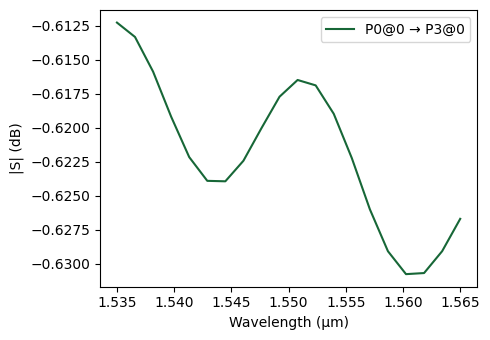
Want to learn more?
Download the full Jupyter notebook from the PhotonForge documentation or explore the example library for more tutorials.


 TERMS & CONDITIONS


 How the process works:
 Try this real URL to see an example: